
Product overview
HazeVane is a self-contained outdoor show-control appliance. It measures local wind direction and speed, models which installed hazers are upwind of one desired coverage area, and transmits dynamically allocated DMX values over ANSI E1.31 sACN.
The appliance continues operating without a cloud service, internet connection, wireless connection, or external computer. A lighting console is optional: local haze distribution works independently, while dedicated sACN input can control hazer power, Output On/Off, site haze demand, and bounded fixture tests.
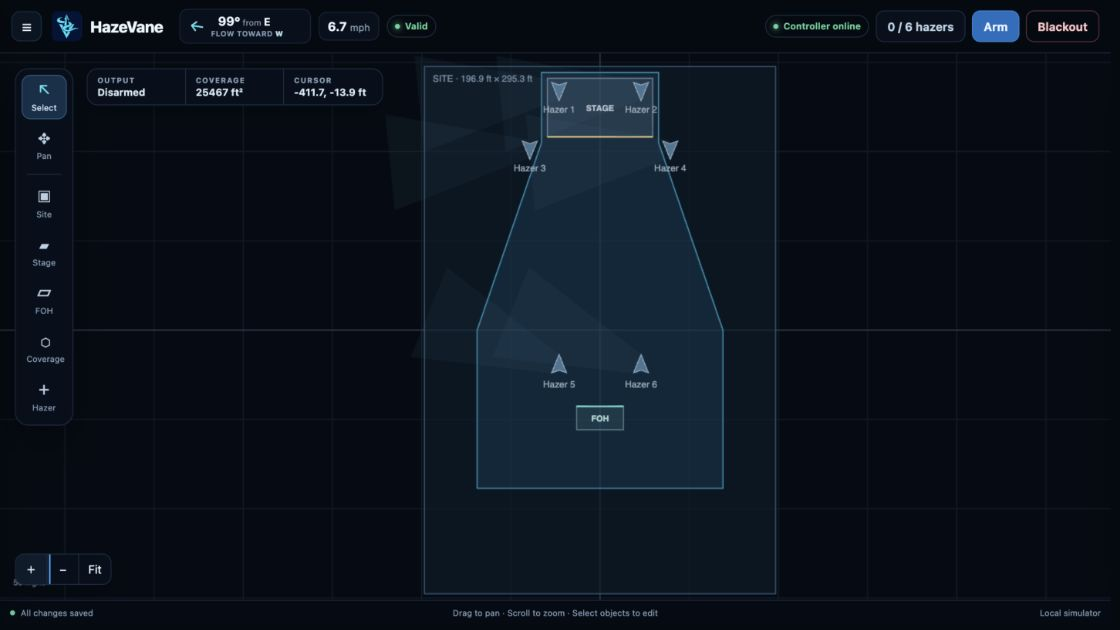
The embedded interface is one infinite canvas: site boundary, stage, FOH, coverage, hazers, live wind, potential plume envelopes, live allocated plumes, and control status remain visible together while contextual inspectors and settings overlays handle detail.
The interactive website demo runs that interface against an isolated browser simulation. The wind overlay starts with Auto enabled and cycles through seven named wind patterns. Choose Manual in that overlay to reveal direction and speed controls. These are demo conveniences, not controller operating modes.
Safety and operating boundaries
- Restrict physical access and control-LAN access to trusted operators.
- Coordinate theatrical haze with venue management, fire detection, alarms, and authorities having jurisdiction.
- Use dedicated output universes. HazeVane does not merge with another source on its hazer output addresses.
- Confirm fixture DMX values against the real fixture manual and hardware.
- Treat predicted plume coverage as a deterministic control heuristic, not computational fluid dynamics or a coverage guarantee.
- Fixture heading and configurable spread/reach influence the model; obstructions, thermal lift, and local turbulence are not modeled in version 1.
Supported hardware platform
| Subsystem | Reference | Notes |
|---|---|---|
| Controller | ESP32-S3R8 | Dual-core LX7, 8 MB PSRAM, 16 MB flash |
| Ethernet | W5500 10/100 | SPI, PoE-powered controller candidate |
| Wind sensor | Gill WindSonic 60 / 75 / M / M Heated | 60/75: Option 2/3 digital output; M: heated or non-heated |
| Sensor data | Full-duplex RS-422 | E2 mode; direct wired UART interface |
| Output | ANSI E1.31 sACN | Multicast, unicast, or both |
Wi-Fi and Bluetooth silicon may exist on the module but must never be initialized or used. The controller’s normal power and communications use wired PoE Ethernet.
Physical installation
Controller and sensor
- Mount the controller and field interface in an enclosure appropriate to weather, impact, condensation, and thermal load.
- Keep the reference sensor cable at or below 5 m between WindSonic and controller interface.
- Orient the WindSonic north marker to the documented site reference or measure a heading offset.
- Terminate shield/chassis, field supply, RS-422 pairs, protection, and isolation according to the approved production design.
- Route data separately from heater current and noisy load wiring.
WindSonic M Heated
HazeVane never sources, switches, monitors, or diagnoses heater power. WindSonic M Heated uses separate installer-provided 10–30 VDC or nominal 24 VAC wiring. Gill recommends a 24 VDC supply capable of the specified startup surge; verify against the current manufacturer manual.
WindSonic 60 and 75
Use Option 2 or 3 in E2 full-duplex RS-422 mode. WindSonic 60 Option 2 requires 5–30 VDC and Option 3 requires 7–30 VDC. WindSonic 75 Option 2/3 requires 12–30 VDC and extends valid measurement to 75 m/s. Option 3 analogue outputs remain unconnected. HazeVane does not support RS-232-only, SDI-12, Modbus, two-wire RS-485, or analogue-only input paths.
Wired network access
Connect PoE Ethernet to the trusted control network. HazeVane starts with DHCP by default and advertises its hostname over mDNS when supported.
| Default hostname | hazevane |
|---|---|
| Browser address | http://hazevane.local |
| Fallback | Use the DHCP lease or configured static IPv4 address |
| Authentication | None; the trusted wired LAN is the security boundary |
Hostname, DHCP, static address, subnet mask, and gateway form one isolated network draft. DHCP disables the three static IPv4 fields. They change only when Save & apply network settings is selected—the sole manual save action in the interface. A status window follows the restart/reconnect countdown and confirms the candidate address automatically; the prior network object returns after 120 seconds if confirmation never succeeds.
WindSonic commissioning and health
Commission the selected supported WindSonic model before connecting it as the production wind source:
Interface  E2 — full-duplex RS-422
Serial     B3/F1 — 9600 baud, 8N1
Output     P3 — continuous, 4 measurements/second
Message    M16 — NMEA IIMWV with Gill status
Units      U1 — meters/second
Terminator L1 — CRLF
Accepted M16/M5 and corresponding WIMWV messages must have correct XOR checksum, relative bearing, finite direction/speed, supported units, and valid status. Settings can accept all supported forms or restrict input to the commissioned M5/M14/M15/M16 profile. Direction is meteorological wind-from bearing. The guided alignment preview applies one site heading offset, then wraps to 0–359.999°.
| State | Meaning | Haze distribution |
|---|---|---|
| Valid | Recent accepted wind | Wind-assisted |
| Calm | Below calm threshold | Uniform output |
| Variable | Direction dispersion high | Reduced wind influence |
| Stale | No recent accepted sample | Blend toward uniform; power retained |
| Fault | Sensor/message fault | Blend toward uniform; power retained |
Site and coverage configuration
The infinite canvas stores all geometry in SI units, while the interface can display and accept feet/mph or meters/m/s. X increases east/right and y increases north/up. Fresh configuration defaults to Imperial display.
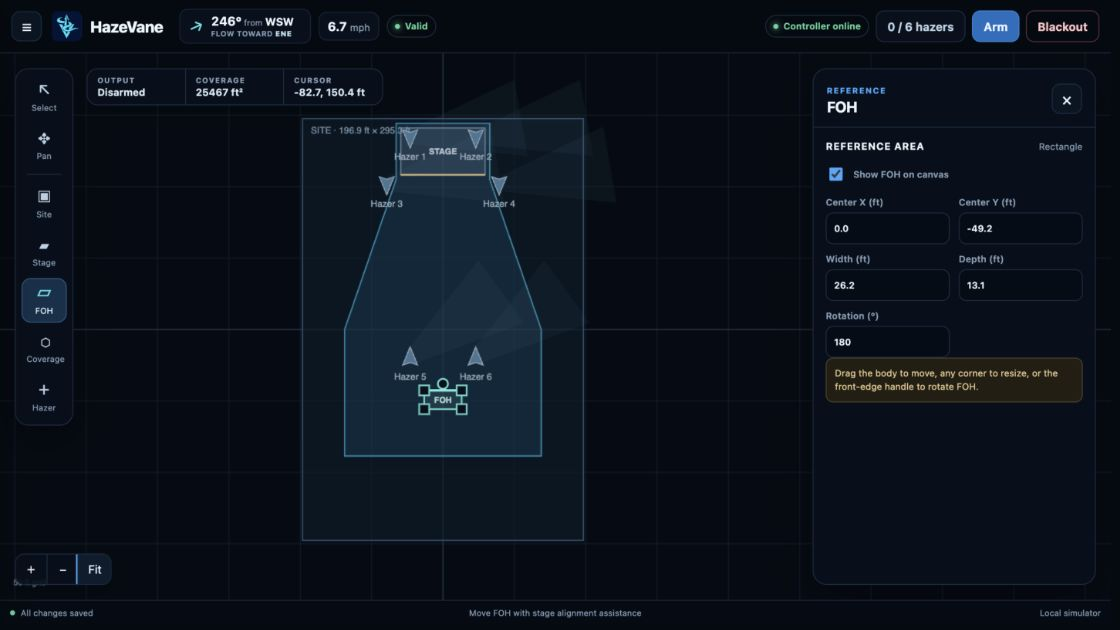
Canvas objects and gestures
- Site: one centered rectangle; drag any corner to resize symmetrically about the fixed origin.
- Stage and FOH: optional reference rectangles; drag the body to move, any corner to resize, or the front-edge handle to rotate.
- FOH assistance: live front-edge distance, center-axis soft snap, and opposed-front-edge rotation snap. Guides can always be pulled through.
- Coverage: one simple, non-self-intersecting polygon with 3–64 directly movable vertices and edge insertion.
- Hazers: up to sixteen movable and rotatable fixtures, always inside the site boundary.
- View: pan infinitely, zoom around the cursor, and fit the site inside the unobscured canvas—even with an inspector open.
- Context menu: right-click near a hazer, coverage vertex/edge, reference, coverage interior, or site for appropriate actions.
Keyboard navigation
Tab reaches every ordinary control and the canvas. Use V/H/S/T/F/C/A for Select, Pan, Site, Stage, FOH, Coverage, and Add Hazer; hold Space for temporary pan; use arrows to pan or nudge selected geometry; and use + / − / 0 to zoom or fit. Enter opens the current inspector or places a hazer. Shift+F10 opens canvas actions. The always-visible Shortcuts ? control lists the complete mapping.
Escape closes one surface at a time—modal, tooltip/menu, settings, inspector—then returns the active canvas tool to Select. Focus follows the restored surface or active tool. Keyboard navigation retains a visible focus indicator, while pointer-started interaction keeps those focus moves visually quiet until keyboard navigation resumes. Operational Hazers, Output, and sACN controls intentionally have no unmodified global shortcut.
Do not compensate a mounting offset in both geometry and sensor heading. Keep the WindSonic representative of conditions across the plotted site. Stage and FOH are references only; they do not directly change haze distribution.
Hazers, patching, and profiles
Configure up to sixteen hazers. Each has a name, profile, enabled state, canvas position, heading, directional influence, plume width/spread, full-fan still-air throw, maximum reach, allocation bias, universe, address, maximum haze, maximum active fan, and idle fan. New fixtures use sequential names and a provisional 4 m still-air throw.
The built-in library contains 55 output-capable profiles across 23 manufacturer or represented-brand groups researched from the LDI 2025 exhibitor directory. Only models with enough authoritative DMX information to produce correct output are selectable. Each profile owns its footprint, channel order, level ranges, binary output-enable behavior, fan and machine-state capability, fixed values, and lifecycle estimates.
User profiles
Open Settings → Hazer profiles to browse the library. Select Copy beside any built-in profile to use it as a starting point, or select Create profile to begin from scratch. Built-ins remain read-only.
| Channel function | Purpose | Limit |
|---|---|---|
| Output Level | Maps nonzero allocated haze from the configured minimum through maximum; zero uses Off | Zero or one |
| Output On / Off | Binary output control following whether this hazer has effective output | Zero or one |
| Fan Level | Maps normalized fan demand through its configured range | Zero or one |
| Machine State | Receives explicit Hazers On and Shutdown values | Zero or one |
| Fixed Value | Sends one unchanged DMX value in every state | May repeat within 32 slots |
Every profile needs Output Level, Output On / Off, or both. The editor exposes only values meaningful to the selected function and includes a compact, collapsed DMX preview for zero output, representative 50% output/fan, and shutdown.
Up to 32 user profiles are stored as separate, CRC-checked records in controller flash and survive physical configuration recovery. Only the distinct user profiles assigned to the active layout are loaded into runtime RAM. An assigned profile cannot be deleted, and its channel count remains locked to prevent an edit from silently changing the live patch; channel functions, values, and lifecycle timings remain editable.
Export profiles downloads every user profile as one portable, versioned file. Import profiles validates the entire file, rejects built-in ID conflicts and unsafe patch changes, then merges profiles by ID without changing site configuration or deleting profiles absent from the file. If any write fails, the browser restores updated records and removes records created by that import; any incomplete rollback is reported explicitly. The current profile format uses schema 2 and intentionally rejects earlier schema-1 bundles; recreate those profiles against the current function model.
Haze distribution
For wind bearing θ, the downwind unit vector is (-sin θ, -cos θ). HazeVane projects a bounded plume from each enabled hazer and estimates how effectively it serves the coverage polygon. The canvas separately renders a live curved envelope: fan allocation supplies forward momentum from the fixture while authoritative wind influence increasingly advects the distal plume. Direct headwind compresses through a centered shape instead of choosing an arbitrary curve side. Calm or unavailable wind smoothly straightens the envelope toward fixture heading.
| Mode | Behavior |
|---|---|
| Automatic | Preserve aggregate operator demand while shifting output toward effective wind-assisted hazers; spill into other hazers when useful units reach their caps |
| Fluid Conservation | Never boost above uniform demand; only reduce hazers whose output is unlikely to help |
| Uniform Output | Send the requested level equally to every enabled hazer and ignore wind |
Fresh configuration defaults to Automatic. Calm air uses uniform output. Stale, faulted, or unavailable wind blends toward uniform over 15 seconds by default; recovery blends wind influence back over 5 seconds. Automatic and Fluid Conservation can derate aggregate output during impractically high wind without changing machine power.
Dynamic allocation
Site Haze Demand is one aggregate request across every enabled machine. Automatic begins from equal per-hazer demand and redistributes that same total using effectiveness and each hazer's Allocation Bias. Per-machine maximums and Maximum Upwind Boost cap the shift; lower-effectiveness machines carry any request that useful hazers cannot.
Fan follows allocated utilization, and ordinary haze/fan changes use bounded slew. Output Capacity reports the current fulfilled share. Each hazer reports effectiveness, contribution, allocation, producing state, and decision reason.
Dashed outlines show each enabled hazer's full potential envelope. The solid live envelope scales reach by raw fan DMX, density by raw haze DMX, and edge emphasis by contribution. The browser smoothly interpolates those values and wind rotation between authoritative snapshots; vector-advection geometry keeps every centerline continuous while wind crosses direct opposition to fixture heading. Output Off removes live haze fill while retaining calculated fan/power DMX and the potential outline.
sACN output
HazeVane emits standards-formed E1.31 data at a configurable 10–40 packets/second per active universe, with independent sequence numbers, stable CID/source name, priority, multicast mapping, and optional unicast destinations.
- Use dedicated output universes and addresses.
- Choose multicast, unicast, or simultaneous multicast-plus-unicast.
- Up to four unicast IPv4 destinations are supported.
- E1.31 Universe Discovery automatically advertises the sorted active-universe list every 10 seconds; there is no separate setting.
- Output remains continuous through autosave, Output Off, sensor fault, warm-up, and shutdown.
- Controlled stream termination sends the required terminated data packets and an empty discovery list. Configuration-driven restart waits for Shutdown Complete; OTA terminates immediately before reboot after validation.
Lighting-console command input
A separate fixed-footprint sACN receiver accepts operator commands without merging console data into hazer output streams.
| Slot | Function | Behavior |
|---|---|---|
| 1 | Remote Enable | Low gives control; high disables takeover |
| 2 | Hazers On / Off | Low On; high Off/shutdown |
| 3 | Output Enabled | Low On; high Off |
| 4 | Site Haze Demand (Dimmer) | Continuous aggregate request, 0–255 |
| 5–20 | Hazer Test 1–16 | Rising edge starts bounded test |
The supplied GDTF and native grandMA3 profiles map Site Haze Demand to standard Dimmer and Hazers On/Off to standard Lamp Control. Other command attributes remain HazeVane-specific.
Input defaults On: universe 63,999; address 1; minimum priority 100; 2.5-second timeout; 10-second test duration. The UI displays timer settings in seconds while the API retains integer milliseconds. Waiting for the first source preserves local power and output. A nonzero expected CID locks to one source. Highest-priority arbitration is deterministic; conflicting equal-priority sources fail safe.
Normal operation
- Confirm the footer reports Controller online, wind health, active sACN transmission, and All changes saved; then verify network mode and fixture patch.
- Read wind-from bearing and downwind Flow toward correctly.
- Confirm canvas/plume motion against site.
- Request Hazers On and wait for Ready, or let commissioned console control power.
- Confirm Output On and set suitable Site Haze Demand.
- Observe effectiveness, contribution, live allocation, producing state, output capacity, and real atmospheric travel.
- Review recent events after unexpected state changes.
- Use Output Off immediately for unexpected haze; use deliberate Hazers Off before power removal or maintenance.
Fault and fail-safe behavior
| Condition | Required response |
|---|---|
| Startup / no directional wind | Uniform haze at operator demand; explicit power retained |
| Wind stale or sensor fault | Blend toward uniform output; power retained; fault visible |
| Output Off | Immediate zero haze allocation; calculated fan/power DMX and sACN stay live |
| Demand exceeds configured capacity | Honor machine caps; report satisfied percentage and unmet demand |
| Hazers Off | Explicit shutdown value; 180-second protected interval |
| Console loss/conflict | Latch power; cancel tests; apply configured hold/return behavior |
| Non-network autosave | Preserve power/phase, output state, wind/filter, takeover, and continuous sACN |
| Interrupted or invalid firmware upload | Do not select the candidate slot; continue running the current image |
| New firmware cannot initialize | Keep ESP-IDF rollback available and return to the prior image |
| Unconfirmed network apply | Restore prior network object after 120 seconds |
| Lost network configuration | Normal reset, then five-second BOOT hold restores DHCP and default hostname |
| Network link loss | No local sends; resume current calculated allocation when link returns |
Configuration workflow
There is no general Apply, Save, or draft workflow. Every non-network edit validates, persists, and applies after a short debounce:
- Watch status move through saving to All changes saved.
- Invalid fields use stable highlighting plus tooltip/toast detail; partial config never applies.
- Verify hazer power/phase, output state, wind/parser state, and console takeover remain continuous.
- Download a complete backup for commissioning records and before maintenance.
- Use Save & apply network settings only for hostname/IP changes; reconnect through the candidate address so the browser can confirm it before the 120-second rollback.
Undo and Redo keep up to 50 logical configuration edits in the current browser session. Repeated typing and one completed geometry gesture coalesce into one edit, then a restored snapshot follows the same validation and autosave path as any other change. Reload clears this browser-only history. The controller stores only current configuration; network apply, live power/output/console state, tests, firmware work, and profile-record operations are never rolled back by Undo.
Download complete backup includes active configuration, staged network values, source metadata, and every custom profile. Restore validates and merges profiles first, then applies configuration. Network values remain staged until the separate network apply action, so restoring a file cannot unexpectedly make the controller unreachable. Profiles omitted from a backup are not deleted.
Settings groups begin collapsed on a new browser and remember which groups were open on later visits. Frequently adjusted distribution and profile controls appear first; network, firmware, diagnostics, and backup controls remain lower in the list.
Confirmations, wind alignment, profile editing, keyboard shortcuts, network apply, reset choices, and firmware update all open in one application-level dialog layer above Settings. The background becomes inert; Escape closes the topmost surface; focus returns to the control that opened it.
At the bottom of System & configuration, Reset canvas restores the standard 60 × 90 m canvas, Stage, FOH, coverage area, and an empty hazer layout while leaving other settings untouched. Reset all settings also restores controller defaults while keeping custom profiles. Reset settings & profiles additionally deletes custom profiles. The latter two retain runtime/fault history, let you reset the network to DHCP at hazevane.local or keep its current settings, and restart only after the hazers finish shutting down.
Dragging and typing coalesce into one write after activity stops. Configuration JSON is bounded to 32 KiB. Unknown, missing, duplicate, invalid UTF-8, malformed, out-of-range, and cross-field-invalid values are rejected. Persistence uses two CRC-protected slots with generation fallback; unsupported storage versions load fresh defaults.
Firmware update
Open Settings → Firmware to see the installed version and update mode, then select Update firmware…. The update window refreshes controller status automatically and keeps technical partition details available on demand. Firmware upload is available in any machine-power state and preserves the operator's Hazers On/Off intent; it does not initiate shutdown or wait for cooldown.
- Review the update, trust, backup, restart, and sACN-interruption notices in the update window.
- Choose an ESP-IDF HazeVane application
.bin. HazeVane checks image magic, application descriptor, project identity, size, secure version, and declared version in the browser. - Select Install & restart. Pending edits are saved and a complete configuration/profile backup downloads automatically before upload begins.
- Keep PoE connected while progress remains in the update window. The controller streams the image through a bounded buffer to the inactive A/B slot.
- After restart, the browser reconnects, confirms the running version, and reloads the embedded interface.
Interrupted or invalid uploads never select the candidate slot. After a valid image is selected, HazeVane terminates sACN and reboots immediately. Connected machines must tolerate that interruption when updating while Hazers On. A newly booted image remains subject to ESP-IDF rollback until NVS, control, UART, Ethernet, sACN, and HTTP initialize successfully.
Diagnostics and local API
The UI exposes complete wind parser/UART counts, sample age/state, per-hazer decision reasons/timers and rolling/total runtime, network counters, output universe sequences, console receiver state/source/priority and conflicts/timeouts, plus newest structured events. Firmware retains 256 events in RAM and a throttled 16-event boot/fault subset across resets. System Resources keeps three compact panels side by side: both processor cores with ESP32 die temperature, consumed internal SRAM/PSRAM, and separate firmware/settings/profile storage meters. The internal chip reading is diagnostic telemetry, not ambient temperature. Normal operation stays visually quiet; noteworthy values receive outlined, labeled attention states, while allocator, task, and partition details remain available on demand. The controller retains one near-boot baseline plus 511 rolling 10-minute samples in volatile PSRAM—about 85 hours—with no monitoring writes to flash. History resets when the controller restarts. The versioned API lives under /api/v1.
| Method | Path | Purpose |
|---|---|---|
| GET | /health | Lightweight health |
| GET | /resource-health | Bounded processor, temperature, memory, storage, and history summary |
| GET | /resource-health/history | One bounded page of controller resource history |
| GET | /status | Live runtime snapshot |
| GET | /config | Active configuration |
| POST | /config/validate | Validate complete candidate |
| PUT | /config | Persist/apply atomically |
| GET / POST | /hazer-profiles | List profiles or create one user profile |
| GET / PUT / DELETE | /hazer-profile?id=<id> | Read, update, or delete one user profile |
| GET / POST | /firmware | Read update capability or upload one image |
| POST | /actions/* | Hazers On/Off, Output On/Off, tests, and confirmed reset scopes |
Mutations require X-HazeVane-Request: 1. There is no authentication; do not route the local API outside the trusted control LAN.
Maintenance and records
- Download an approved complete backup after changes and before firmware maintenance.
- Record firmware, controller MAC/CID, IP, sensor serial/profile, heading, fixture models/patch, console patch, and boot policy.
- Review reset reason and recent persistent boot/fault events; export external records before the bounded history rolls over.
- Inspect enclosure, PoE, Ethernet, sensor cable, shield/protection, and heater wiring.
- Re-test On, zero haze, fan, Shutdown, warm-up, and cooldown after fixture firmware/personality changes.
- Repeat packet capture, link-loss, network rollback/recovery, firmware interruption, brownout, restart, and soak tests after firmware/hardware changes.
Software limits and defaults
| Site / stage / FOH | One rectangle each; stage and FOH optional |
|---|---|
| Coverage polygons | 1 |
| Polygon vertices | 3–64 |
| Coverage samples | 256 maximum |
| Hazers | 16 maximum |
| Supported wind models | WindSonic 60, 75, M, and M Heated |
| Maximum configured wind speed | 60 m/s for WindSonic 60, M, and M Heated; 75 m/s for WindSonic 75 |
| Built-in profiles | 55 output-capable profiles across 23 brand groups |
| User profiles | 32 maximum; 1–32 channels each |
| Profile runtime cache | 16 distinct user profiles maximum |
| Boot defaults | Hazers On; Output On |
| Control defaults | Site Demand 40%; Automatic; sACN Input On |
| Fresh display units | Imperial; Metric selectable and persistent |
| Sensor fallback defaults | 15-second return to uniform; 5-second recovery blend |
| High-wind defaults | Derate from 8 m/s; cutoff at 12 m/s |
| Console-loss defaults | Hold 60 seconds; return to local demand over 15 seconds |
| Output universes | 4 maximum |
| Universe Discovery | Active-universe list every 10 seconds |
| Unicast destinations | 4 maximum |
| Output rate | 10–40 packets/s |
| Console footprint | 20 slots |
| Configuration size | 32 KiB maximum |
| Structured event ring | 256 RAM entries; 16 persistent boot/fault entries |
| Network confirmation window | 120 seconds |
| Reference sensor rate | 4 Hz |
| Reference stale timeout | 1,250 ms |
| Sensor cable reference | 5 m maximum |
Release status and acceptance gates
The v0.28.0 software baseline runs the same bounded wind, geometry, distribution, fixture, sACN output, and command-input core on host simulator and ESP32-S3. Its Automatic, Fluid Conservation, and Uniform Output modes preserve operator control while treating wind as useful allocation input rather than a hard haze gate. It includes continuous sensor fallback/recovery, high-wind derating, console loss hold/return, exact profile functions, complete keyboard canvas navigation, application-level modal workflows, continuous fan-and-wind vector plume visualization through direct headwind, fixed-buffer resource monitoring with conservative PSRAM history, mandatory E1.31 Universe Discovery, 55 built-in profiles, a durable 32-profile user library, guarded A/B firmware update, diagnostics, network rollback, and physical DHCP recovery.
Still required before field release
- Production RS-422 isolation/grounding/surge/ESD/termination validation
- WindSonic 60, 75, M, and M Heated sensor, enclosure, connector, PoE, heater, and thermal acceptance as applicable
- Real-fixture level thresholds, binary output enable, warm-up, shutdown, and DMX-loss verification for every deployed profile
- Packet capture against receivers and console acceptance
- HIL verification of network rollback and physical recovery on the final board
- Link-loss, brownout, firmware interruption, watchdog, and long soak tests
- External release-key custody, signed-image pipeline, device provisioning, and manufacturing recovery policy